
Revision history [back]

If you receive ‘not enough license’ error message, you can release the license by clicking the "Release License" button, or you can wait 15 minutes, and the files will be unlocked automatically.
Please refer to this link for more details at the release license topic: Release license topic 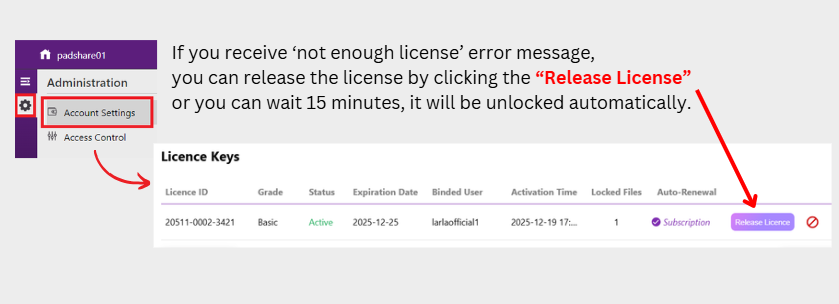
I recommend saving your files before closing them each time. The license is currently used when you open a file to work, and it will not be released if the file is not saved properly before closing. You might be holding the license to open files, and if you close a file without saving it, the license will still be held for that file.
If you receive ‘not enough license’ error message, you can release the license by clicking the "Release License" button, or you can wait 15 minutes, and the files will be unlocked automatically.
Please refer to this link for more details at the release license topic: Release license topic [https://wiki.padsystem.com/doku.php?id=en:padsystemversion8.0:padsystem8cloudusermanual#license_management]
I recommend saving your files before closing them each time. The license is currently used when you open a file to work, and it will not be released if the file is not saved properly before closing. You might be holding the license to open files, and if you close a file without saving it, the license will still be held for that file.